APP清理垃圾动画-Framer实现

APP清理垃圾动画,尝试用Framer实现效果,源代码贴出来和sketch文件在附件中,大家相互交流学习。本来想发到作品里面的,作品里面只能上传图片。不能贴源码。好在注释比较详细!
APP清理垃圾动画,尝试用Framer实现效果,源代码贴出来和sketch文件在附件中,大家相互交流学习。本来想发到作品里面的,作品里面只能上传图片。不能贴源码。好在注释比较详细!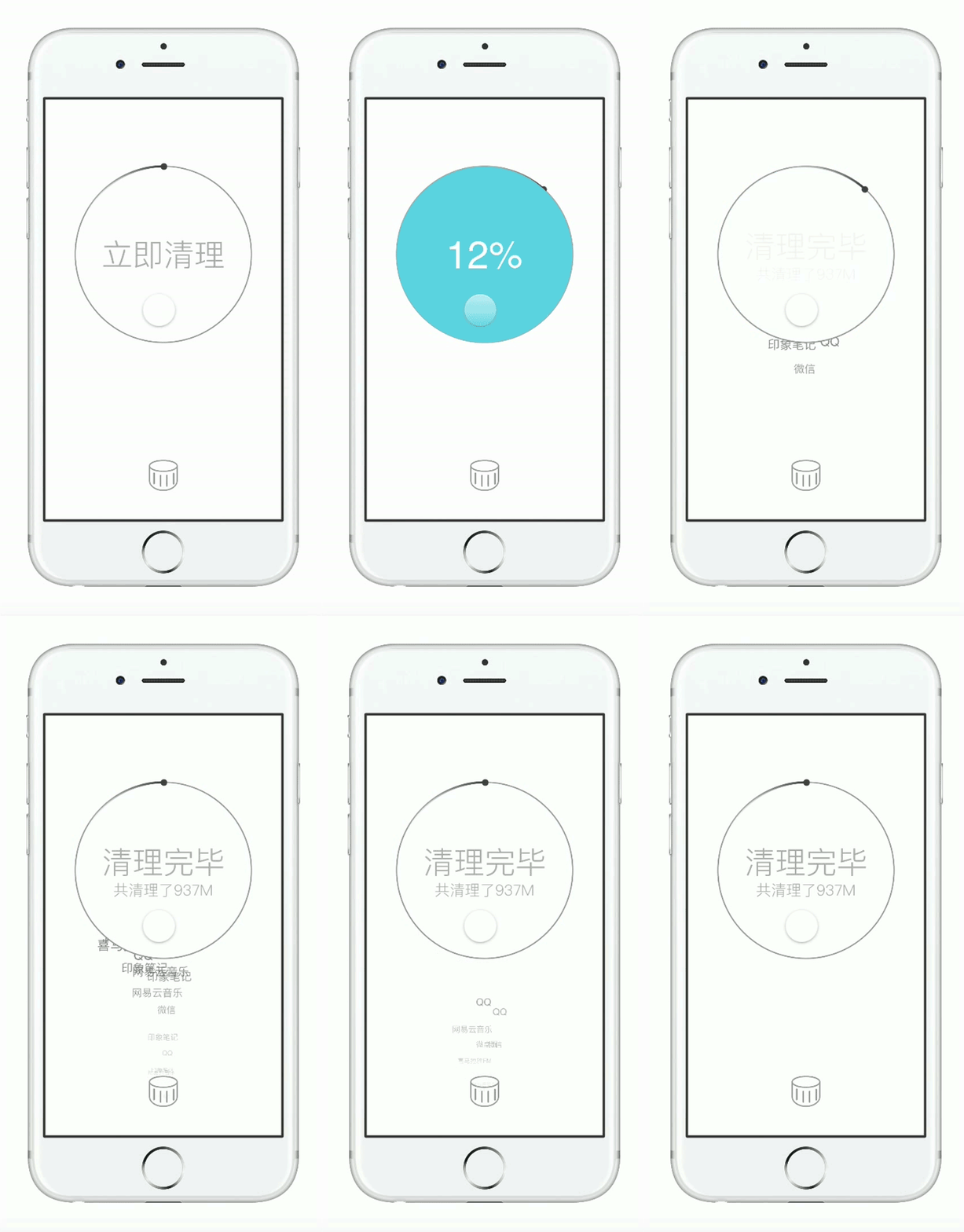
# 导入sketch文件
clean = Framer.Importer.load("imported/clean@1x")
#直接用图层名引用对象
Utils.globalLayers clean
#点击效果刚开始不显示
press.opacity = 0
#清理完成刚开始不显示
over.opacity = 0
#给立即清理添加状态
go.states.add
default:
opacity: 1
upload:
opacity: 0
#这里要实现进度条的旋转必须新建一个图层在外面包住旋转图形,大小请参考sketch文件
xzbg =new Layer
width: 578
height: 578
y: 202
backgroundColor: null
xzbg.centerX();
#设置旋转对象的父元素为隐藏图层
wei.superLayer = xzbg
wei.x = 50
wei.y = 0
#实现百分比图层样式
bfb = new Layer
y: 480
width: 300
height: 130
opacity: 0
backgroundColor: null
bfb.centerX()
bfb.style =
"font-size" : "122px"
"color" : "#FFF"
"text-align" : "center"
bfb.html = 0
#设置隐藏图层在pass背景图层上面
xzbg.placeBefore pass
#给立即清理添加状态
over.states.add
default:
opacity:1
upload:
opacity:0
#实现旋转动画状态
xzbg.states.add
default:
rotation: 360
upload:
rotation: 0
#设置旋转动画属性
xzbg.states.animationOptions =
repeat: 1
curve: "linear"
time: 1
#监听旋转,根据旋转的度数获取百分数值,然后把百分数值赋值给百分比图层
xzbg.on "change:rotation", ->
percentage = Utils.modulate xzbg.rotation, [0,360], [0, 100]
bfb.html = (Utils.round percentage, 0) + "%"
jindu.visible = false
#定义APP数组
app = [ "微信" , "QQ" , "印象笔记" , "网易云音乐" , "喜马拉雅FM" , "微桌面" ]
#点击事件添加状态
press.states.add
default:
opacity: 1
upload01:
opacity: 0
#点击事件添加动画状态
press.states.animationOptions =
time: .1
#点击事件
xzbg.on Events.Click, ->
#显示百分比
bfb.opacity = 1
#隐藏立即清理
go.opacity = 0
#播放动画时隐藏清理完毕
over.states.switchInstant "upload"
#显示蓝色背景
press.states.switch "default"
#开始旋转
xzbg.states.switch "default"
#开始循环
for [1..20]
#从app数组中随机抽取一个
color = Utils.randomChoice app
#新建承载图层
text01 = new Layer
width: 300 , height: 80
html: "#{color}"
backgroundColor: null
x: Utils.randomNumber +100, Screen.width - 420
y: 580
style: "font-size" : "48px","color" : "#666","text-align" : "center","line-height" : "72px"
#给承载图层添加动画
text01.animate
properties:
y: Screen.height - 100
x: Screen.width/2-150
scaleX: .2
scaleY: .2
opacity: 0
time: Utils.randomNumber 1.5, 2.5
delay: Utils.randomNumber 0, 2
curve: "ease-in"
text01.placeBehind pass
text01.on Events.AnimationEnd, ->
#已经用完,及时销毁
this.destroy()
#恢复到初始状态
xzbg.on Events.AnimationEnd,->
press.states.switch "upload01"
xzbg.states.switchInstant("upload")
bfb.opacity = 0
over.states.switch "default"