每日 AI 资讯日报

该内容为人工智能生成合成,请注意甄别
适合谁
AI 赛道运营/科技自媒体
目标结果
一键生成 AI 每日简报
场景
其他
ai资讯
日报
obsidian
情报简报
科技自媒体
新闻聚合
使用说明
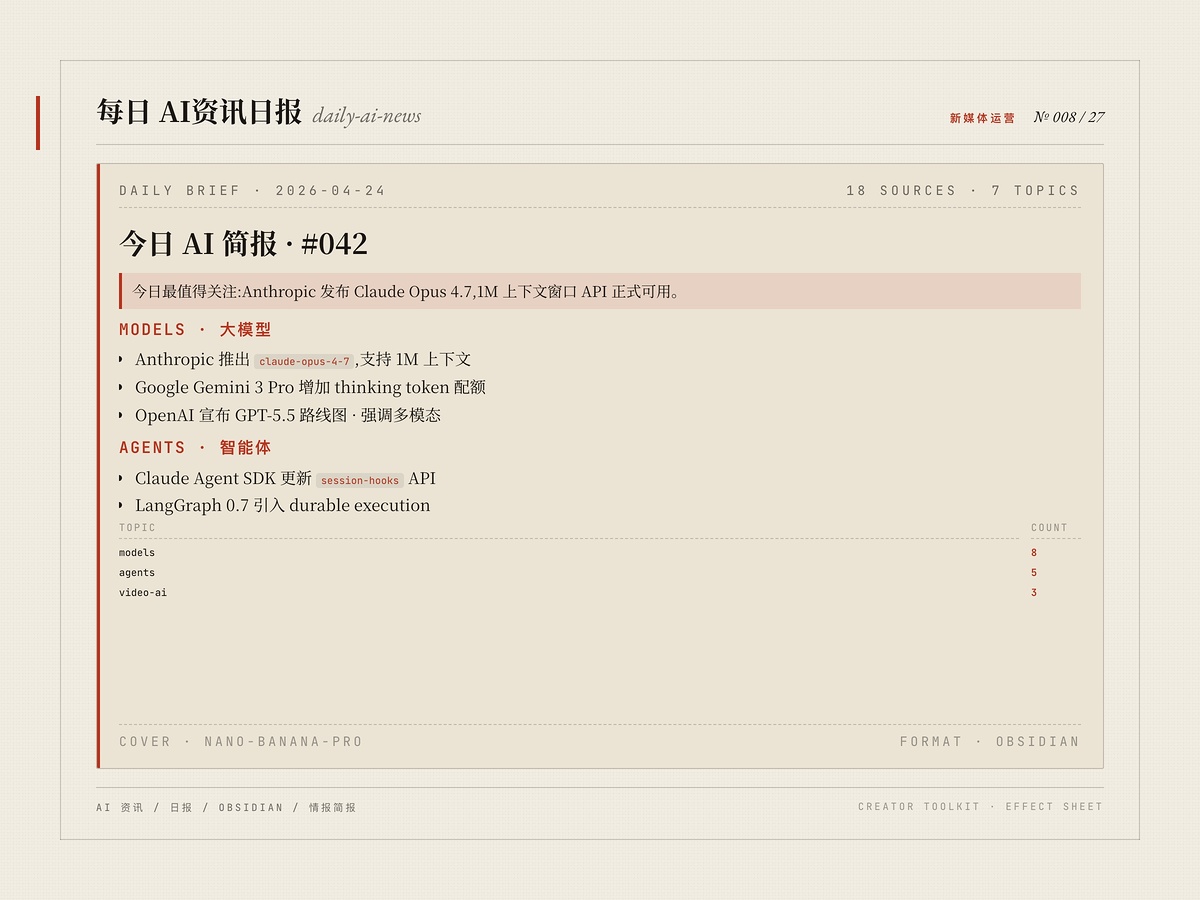
聚合全网最新 AI 新闻,自动归类整理并生成 Obsidian 风格 Markdown 简报。报告含 callout、表格、亮点提炼,并通过 nano-banana-pro 为每条新闻生成配图与数据可视化图表。适用于科技自媒体日更、AI 团队情报简报、AI 课程/训练营素材更新等场景,显著降低信息筛选与排版成本。
安装命令详情
Agent 安装(提示词)
推荐把安装 Prompt 交给兼容 Agent,即可在 ClaudeCode / Cursor / OpenClaw 这类宿主里按推荐方式拉起并启用 Skill。
请直接执行以下命令安装 skill,不要修改任何参数,也不要尝试其他安装方式:
npx zcool-skills add daily-ai-news -g -y
要求:
1. 先检查 node、npm、npx 是否可用,若缺失、版本异常或环境变量未生效,请优先自动修复当前运行环境,再继续执行安装流程。
2. 执行完成后明确返回:
- skill_name: daily-ai-news
- success: true/false
- message: 安装结果或错误原因
3. 如果失败,不要自行重试其他不确定命令。
下载 Skill 包
通用安装方式,适合手动归档、团队分享和离线留存。
daily-ai-news.zip
CLI 安装
适合已经在 openclaw / Cursor / 龙虾 里稳定使用 Skill 的团队,同步和脚本化部署效率最高。
$ npx zcool-skills add daily-ai-news -g -y
文件预览
SKill.md
---
name: daily-ai-news
description: |
  Aggregate and summarize the latest AI news into a beautifully formatted Obsidian report.
  Generates AI illustrations and chart images via nano-banana-pro, with callouts, tables,
  and highlights.

  Activate when the user asks for: today's AI news, AI updates, latest AI developments,
  daily AI briefing, AI industry news, AI trends, AI breakthroughs,
  "给我今天的AI资讯", "AI有什么新动态".
---

# Daily AI News Briefing

Aggregate the latest AI news and deliver a formatted Obsidian markdown report with
AI-generated illustrations and data charts.

## Prerequisites

### Environment Variables

- `GEMINI_API_KEY` — required for AI image generation (Gemini Image Generation API)

### Dependencies

No additional npm packages required for image generation.

### Image Generation Script

Located at `scripts/generate-image.mjs` (relative to this skill directory).

```bash
GEMINI_API_KEY=$GEMINI_API_KEY node scripts/generate-image.mjs \
  --prompt "description of the image" \
  --output "/path/to/output.jpg" \
  --aspect "16:9" \
  --resolution "2K"
```

## Obsidian Vault Configuration

- **Vault path**: `<YOUR_OBSIDIAN_VAULT>/AI-info/`
- **Images directory**: `assets/` (inside the vault)
- **File naming**: `YYYY-MM-DD-AI-News.md`

If the vault path does not exist, ask the user for their Obsidian vault location.

## Workflow

```
Phase 1: Information Gathering
  ├─ Direct website fetching (3-5 major AI news sites)
  └─ Web search with date filters
      ↓
Phase 2: Content Filtering
  ├─ Keep: Last 24-48 hours, major announcements
  └─ Remove: Duplicates, minor updates, old content
      ↓
Phase 3: Categorization (5 categories)
      ↓
Phase 4: AI Image Generation
      ↓
Phase 5: Obsidian Markdown Formatting
      ↓
Phase 6: Save & Open in Obsidian
```

## Phase 1: Information Gathering

### Step 1.1: Fetch from Primary Sources

Use `WebFetch` to fetch content from 3-5 major AI news websites. Pass a prompt like
"Extract all AI news headlines, summaries, dates and links from this page".

Recommended sources (choose 3-5 per session):
- VentureBeat AI: https://venturebeat.com/category/ai/
- TechCrunch AI: https://techcrunch.com/category/artificial-intelligence/
- The Verge AI: https://www.theverge.com/ai-artificial-intelligence
- MIT Technology Review AI: https://www.technologyreview.com/topic/artificial-intelligence/
- AI News: https://artificialintelligence-news.com/
- AI Hub Today: https://ai.hubtoday.app/

### Step 1.2: Web Search Queries

Use `WebSearch` with date-filtered queries across different categories in parallel:

- General: "AI news today" OR "artificial intelligence breakthrough"
- Research: "AI research paper" OR "machine learning breakthrough"
- Industry: "AI startup funding" OR "AI company news"
- Products: "AI application launch" OR "new AI tool"

Always use current year in queries. Prioritize sources from the last 24-48 hours.

### Step 1.3: Fetch Full Articles

For the top 10-15 most relevant stories, use `WebFetch` with descriptive prompts
to get full article content for accurate summarization.

## Phase 2: Content Filtering

### Keep

- News from the last 24-48 hours (preferably today)
- Major announcements (product launches, model releases, research breakthroughs)
- Industry developments (funding, partnerships, regulations, acquisitions)
- Technical advances (new models, techniques, benchmarks)
- Significant company updates (OpenAI, Google, Anthropic, etc.)

### Remove

- Duplicate stories (keep the most comprehensive version, note alternative sources)
- Minor updates or marketing fluff
- Content older than 3 days unless highly significant
- Non-AI or tangentially related articles

## Phase 3: Categorization

Organize news into 5 categories:

| Category | Content Types |
|:---------|:-------------|
| Major Announcements | Product launches, model releases, major company news |
| Research & Papers | Academic breakthroughs, new papers, novel techniques, benchmarks |
| Industry & Business | Funding, M&A, partnerships, market trends |
| Tools & Applications | New frameworks, practical applications, open source releases |
| Policy & Ethics | Regulations, safety, social impact, government initiatives |

## Phase 4: AI Image Generation

Generate two types of images using `generate-image.mjs`:

### Section Illustrations

For each of the 5 categories + Key Takeaways, generate a thematic illustration.
Prepend "flat illustration style" and append "no text no letters" to prompts.

| Section | Suggested Prompt Keywords |
|:--------|:--------------------------|
| Major Announcements | futuristic product launch, glowing screens, digital innovation |
| Research & Papers | neural network visualization, brain synapses, data flowing |
| Industry & Business | silicon chip circuit board, tech industry, blue gold tones |
| Tools & Applications | developer workspace, code on screens, modern tools |
| Policy & Ethics | global network connections, digital globe, policy governance |
| Key Takeaways | humanoid robot thinking, futuristic AI concept, clean modern |

### Chart/Diagram Images

Generate 3-5 chart images per report using Chinese-language prompts.
See `references/chart-prompts.md` for detailed prompt patterns and guidelines.

### Image Generation Commands

```bash
GEMINI_API_KEY=$GEMINI_API_KEY node <skill-dir>/scripts/generate-image.mjs \
  --prompt "<prompt text>" \
  --output "<vault-path>/assets/<image-name>.jpg" \
  --aspect "16:9" \
  --resolution "2K"
```

Important:
- Use descriptive filenames tied to the date: e.g., `2026-03-12-announcements.jpg`
- Create `assets/` directory if it does not exist
- Generate images sequentially to avoid API rate limits
- If generation fails, retry once with a shorter prompt, then skip and continue

### Fallback

If `GEMINI_API_KEY` is not set or image generation fails repeatedly:
- Continue with the report, omit `![[image]]` embeds
- Notify the user that images were skipped

## Phase 5: Obsidian Markdown Formatting

Use the template in `references/obsidian-template.md` for the full report structure.

Key formatting rules:
- Chinese (Simplified) for body content; English for technical terms and section headers
- At least 6 different callout types per report
- 3-5 AI-generated chart images embedded
- `==text==` highlights for key numbers, product names, and critical terms
- Aligned tables with centered numeric data
- 3-5 dynamic frontmatter tags based on the day's topics

## Phase 6: Save & Open

### Save the Report

```bash
mkdir -p <YOUR_OBSIDIAN_VAULT>/AI-info/assets/
```

Write the markdown file to:
```
<YOUR_OBSIDIAN_VAULT>/AI-info/YYYY-MM-DD-AI-News.md
```

### Open in Obsidian

```bash
open "obsidian://open?vault=AI-info&file=YYYY-MM-DD-AI-News"
```

## Customization Options

After providing the initial briefing, offer customization:

| Option | Choices |
|:-------|:--------|
| Focus area | Research only, Products/tools, Industry/funding, Specific companies |
| Depth level | Brief (headlines + 1-2 sentences), Standard (default), Deep (with charts and analysis) |
| Time range | Last 24 hours (default), Last 3 days, Last week |
| Image style | Flat illustration (default), Photorealistic, Abstract |

## Follow-up Interactions

- "Tell me more about [story X]" — fetch the full article, provide detailed summary
- "What are experts saying about [topic Y]?" — search for expert opinions
- "Only show research papers" — filter to Research & Papers category
- "Regenerate images" — re-run Phase 4 with adjusted prompts

## Quality Checklist

- [ ] All image embeds reference existing files in `assets/`
- [ ] No duplicate stories across categories
- [ ] All items have timestamps (preferably today)
- [ ] Summaries are accurate (not hallucinated)
- [ ] At least 6 different callout types used
- [ ] At least 3 AI-generated chart images included
- [ ] Frontmatter is valid YAML
- [ ] Highlights used for key terms throughout
- [ ] Report opened successfully in Obsidian

## Error Handling

- `WebFetch` fails — skip and try next source
- Search returns no results — expand date range or try different query
- Image generation fails — continue without images, notify user
- `GEMINI_API_KEY` not set — skip images, suggest user set the token
- Obsidian vault not found — ask user for vault path
- Paywalled content — use available excerpt and note limitation
声明
本站部分 Skill 技能内容来源于互联网或由用户上传,使用前请注意识别相关风险,内容版权归原作者所有。如Skill技能涉及版权问题,请发送邮件至 jubao@zcool.com.cn,我们将在收到通知后及时核实并予以下架处理。
使用评价

2000
安装使用